

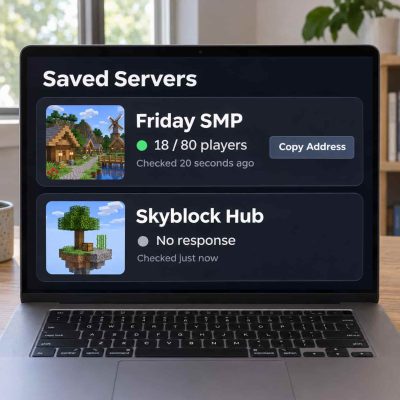
 You’re about to launch Minecraft, but you want to know whether your usual Survival server is responding and whether anyone is playing. Even the best Minecraft servers have quiet hours and occasional downtime, so a status app can save you a trip to an empty lobby. Build the first version around a simple routine. A player saves a server address, opens the app later, and sees whether the server responded, how many players it reported, and when it was last checked. When they’re ready to play, they can copy the address and open Minecraft.
Save the Addresses Players Already Use
For a first version, build a web app for public Java Edition servers. Give players a form with an address and an optional nickname, such as “Friday SMP.” Accept a hostname with or without a port, as well as a literal IP address. Trim extra spaces and flag malformed addresses with a message that shows what to enter. Keep the original address for copying while using a normalized form to identify duplicate entries.
Store the favorites in browser local storage so they survive a reload without requiring an account. Each entry can carry an internal ID, nickname, and address. Give players a way to edit or remove an entry. If an address changes, discard its previous status and check the new one. Local storage is tied to the site and browser, so someone opening the app on a different device will have a separate list.
Request Status From the Server
Use a backend endpoint to check the browser. The browser sends the saved address to the endpoint, and the backend uses a Minecraft protocol library to request status. For Java Edition, the standard mechanism is Server List Ping. It can return the server description, advertised version, online player count, and advertised maximum without logging into the world. Choose a library that handles Java’s default port and Minecraft DNS service records so it can follow the same destination rules players expect.
Set a short deadline for each check and return a small, consistent response to the app. Include the outcome, check time, and player counts when available. Treat server descriptions as untrusted text and render them as text if you display them. Cap response sizes too. Because users supply the destination, configure the backend to check only public destinations. Validate the resolved IP, including any DNS service target, and connect to the validated address. Enforce that restriction at the network layer and rate-limit requests to protect the service.
Make Counts and Availability Easy to Read
Give each saved server a card with its nickname, address, latest result, and a Copy Address button. If the server replies with 18 online out of an advertised maximum of 80, show “18 / 80 players” alongside “Checked 20 seconds ago.” A response with zero players should display zero. A response that omits usable counts should display “Player count unavailable.”
Use “No response” when a check times out. A server can turn off status queries, and a temporary network problem can also prevent a reply. If you retain an earlier successful count, label it clearly, such as “Last reported 18 players at 8:42 p.m.” A successful status check also leaves open whether a specific player can join. The game may still enforce an allowlist or require a compatible version.
Refresh Without Overloading the Service
Check saved servers when the app opens and give players a manual refresh button. For automatic updates, start with an interval such as 60 seconds while the page is visible. Cache recent checks on the backend and reuse a check already in progress for the same destination. If several people save the same server, their requests can share one result. Limit how many checks run at once so a long favorites list stays manageable.
Keep the check timestamp from the backend when serving cached data. If a response was measured 40 seconds ago, display that age even if the browser received it just now. When several checks run together, update each card as its result arrives. Someone checking a busy Skyblock server can see its count while an unrelated Survival server is still waiting to respond.
Test the App Against Realistic Results
Use a server you control to test a normal response, an empty server, and a disabled status query. Simulate a slow reply and a response with missing counts. Reload the browser to confirm saved addresses return, then change an address during a refresh and check that the old response never appears on the edited card. Test a custom port and a hostname that uses a DNS service record.
Test how the app behaves when its own status service is unavailable. Show “Couldn’t check right now” and keep the saved list visible so players can still copy an address. Keep that app error distinct from a Minecraft server timeout. If you include a response time, label it as measured from your backend. A check from a data center can have a very different round trip from the connection a player gets at home.
Finish by trying the whole routine as a player. Save two servers, close the app, and open it later. You should be able to see which one responded, how many players it reported, and when the result was collected. Then copy the address you want and paste it into Minecraft’s multiplayer screen.